
A MeasureUp Practice Test is a high-quality, interactive tool designed to help you prepare for official IT certification exams. These tests simulate the real exam experience, offering questions that match the format, difficulty, and objectives of the actual certification.
With a MeasureUp Practice Test, you can:
- Practice in two modes:
- Practice Mode, with detailed explanations and references for each question.
- Certification Mode, which mimics the real exam environment.
- Track your progress with performance reports that highlight your strengths and areas for improvement. Be sure to download and save your progress reports!
- Build confidence by practicing with questions developed by experts and aligned with the latest exam objectives.
To access a MeasureUp Practice Test within your Skilling Suite course, follow these steps:
- Log in to skilling.pearsonvue.com using your Pearson credentials.
- On your course dashboard, click the course you’d like to practice.
- Expand the table of contents and scroll to the bottom to find the Practice Exam section.
- Click on the “Launch” button to access the service.
Practice Test Launch Options
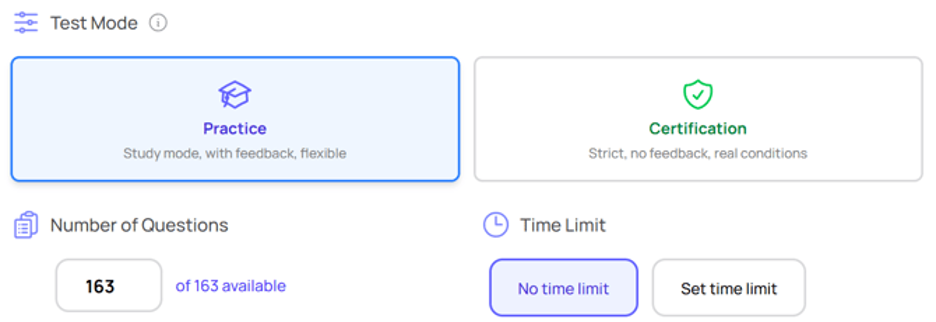
Certification Mode
Certification mode is designed to simulate the official certification exam. It includes the same number of questions, the same mix of question types and difficulty level in each domain, and it has the time limit as the real exam.
Practice Mode
Practice mode is designed for learning and review, with several customization options:
- Select the number of questions for your attempt.
- Choose whether to set a time limit or not.
Advanced Settings (available only in Practice Mode)
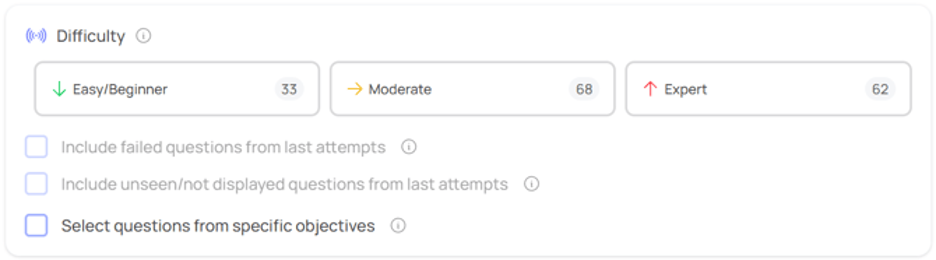
Question Filters
In the advanced settings you can apply question filters, which allows you to customize your attempt by filtering questions based on:
- Difficulty level
- Questions answered incorrectly in previous attempts
- Questions not yet seen
- Specific exam objectives
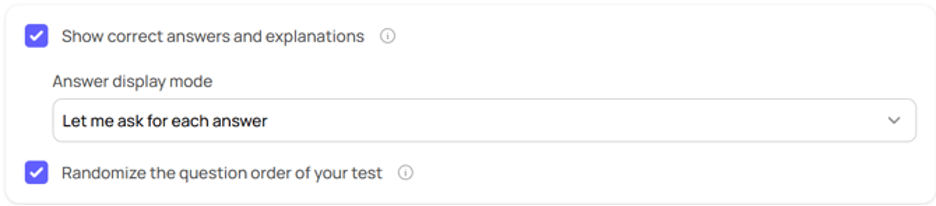
Test Behavior
By configuring Test Behavior, you can define how correct answers and explanations are displayed, and in what order. This allows you to begin with more guidance and remediation and then take these supports away over time as you grow more comfortable with the material.
Once you’ve configured your Practice Mode settings, you’ll have the opportunity to review your selected configuration before you begin. (In Certification Mode, this will be pre-set),
Then click Start Now to begin your practice session.
Exam Pass Pledge Reminder
Be sure to save and review the Score reports you receive after each practice session. The Skilling Suite does not yet store these reports, so once you click away from the test results, they cannot be retrieved.
If you would like to take advantage of our Exam Pass Pledge, we recommend downloading and saving the score reports for any practice tests taken in Certification mode, as these reports will serve as supporting documentation that you met the criteria of our Exam Pass Pledge guarantee.